
Free ResourcesTools & training
Health and safety management software for South African workplaces.
OHSE Assistant brings your risk assessments, procedures, registers, incidents, contractors and legal duties into one connected system — built on the OHS Act and its regulations, hosted in Johannesburg, and set up by the consultants who run safety files and audits for a living.
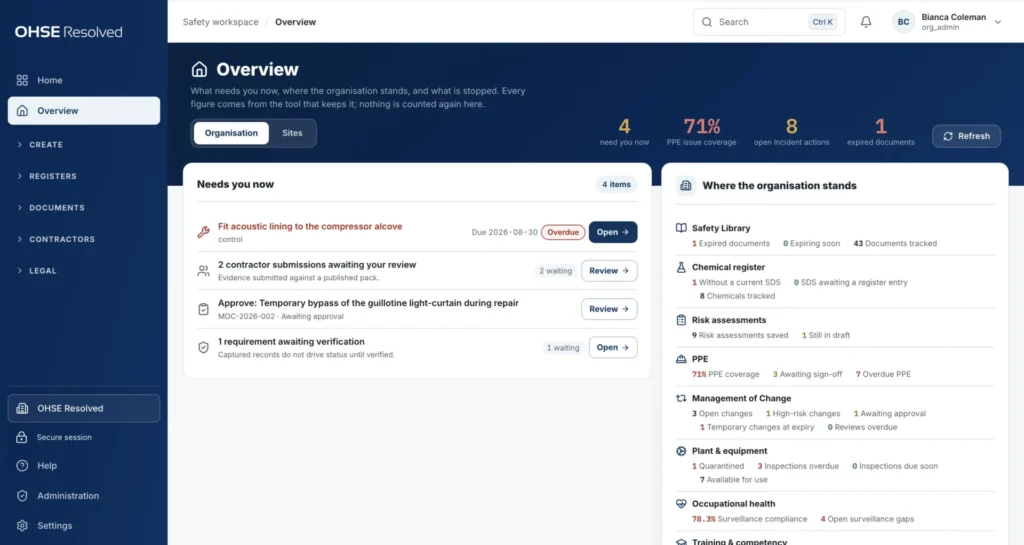 The Overview — what needs you now
Built for workplaces where the OHS Act applies.
From offices and retail environments to factories, warehouses, construction sites, laboratories and contractor operations — OHSE Assistant brings the requirements, records, assessments and everyday safety processes of your workplace into one connected system.
Manufacturing & workshops
Manage machinery and equipment inspections, pressure equipment, lifting machinery, hazardous chemical agents and SDSs, PPE, occupational hygiene requirements, risk assessments and workplace safety records.
Warehousing, logistics & retail
Keep control of forklifts and equipment, workplace inspections, contractor compliance, incidents and near misses, emergency preparedness, first aid, fire equipment and routine safety checks.
Construction & contractors
Build and maintain site-specific risk assessments, method statements, safe work procedures, toolbox talks, competency records, contractor documentation, appointments and supporting evidence.
Pharma, laboratories & food
Control hazardous chemical agents and SDSs, occupational health requirements, risk assessments, inspections, controlled documents, training records and compliance evidence.
And workplaces across every other sector
If the Occupational Health and Safety Act and its applicable regulations form part of your workplace obligations, OHSE Assistant is built to help you manage them — from identifying what applies to keeping the evidence that shows it is being done.
A shared drive can’t tell you what is overdue. OHSE Assistant can.
Most safety files live in a filing cabinet or a folder on the server. Nothing in them can tell you who is not authorised, which machine is stopped, or which control was bypassed last week. OHSE Assistant keeps every record live and lets each one drive the next.
Plan the work
Scope of work, method statement, risk assessment, safe work procedure and toolbox talk — each created from the one before it, with revisions, sign-offs, exports and a visible chain between them.
- Live risk register
- 5×5 matrix
- Role-based sign-off
- Word & PDF
Run the registers
PPE, plant and equipment, chemicals and SDS, occupational health, training, management of change and contractors. Every register works out its own status, so the Overview never counts anything twice.
- QR labels
- Second-person return to service
- Role-based PPE coverage
- Expiry reminders
Prove compliance
A controlled Safety Library, a scoped Legal Register and a Legislation Assistant grounded in the OHS Act and its regulations. Ask what the law requires and file the answer as evidence.
- Sourced legal answers
- Action checklists
- Audit log
- XLSX & PDF exports
See the work behind the dashboard.
Pick a story and follow the numbered points. Every screen is a real capture of the application.
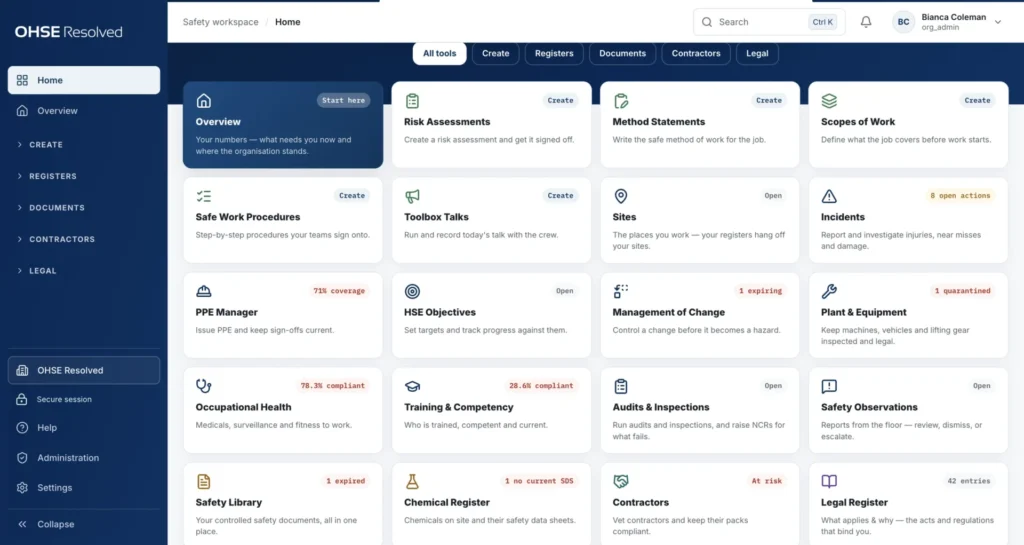
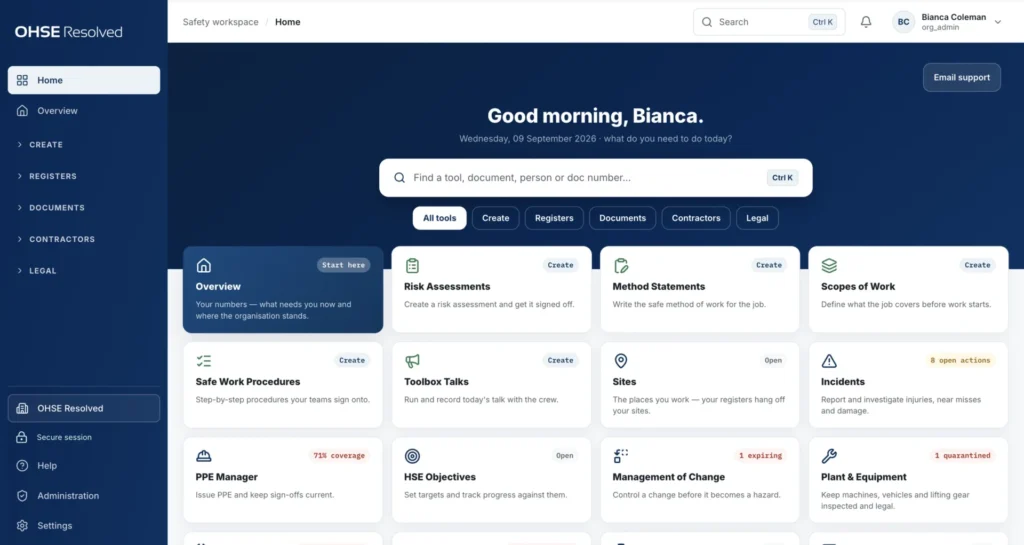
Every tool on one Home screen.
Twenty-one tools, grouped the way safety work is done: create, registers, documents, contractors and legal. Each tile shows its live status.
- 1Filter by groupCreate, registers, documents, contractors or legal.
- 2Start with the OverviewWhat needs you now, in one place.
- 3Live status on every tileQuarantined plant, expiring changes, open actions — before you open the tool.
One overview of everything that needs a decision.
The Overview shows what is waiting on a person and where every register stands. Every figure comes from the register that owns it.
- 1Needs you nowOverdue actions, reviews and approvals, oldest first.
- 2Where the organisation standsEvery register's position at a glance.
- 3Headline figuresEach number links to the register that produced it.
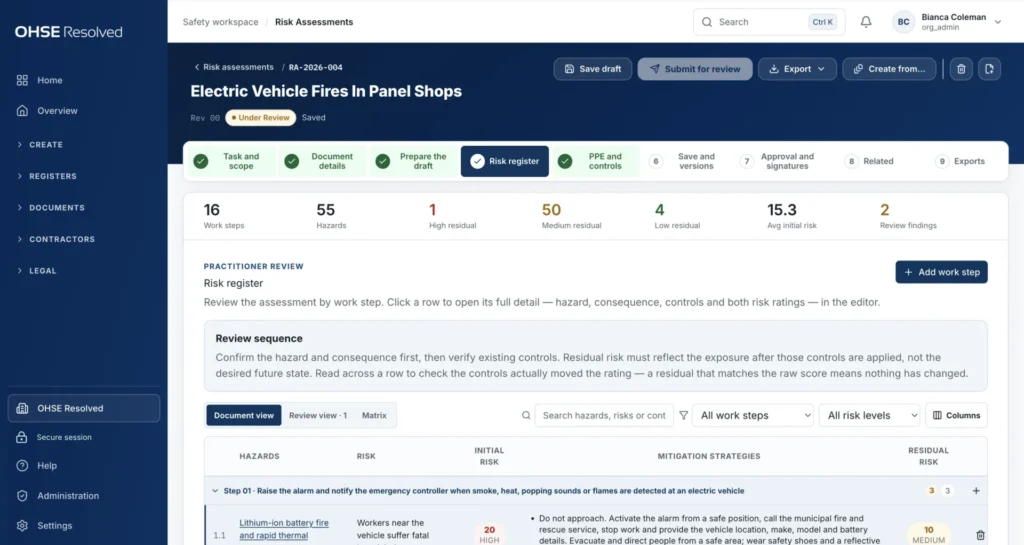
Risk assessments that stay live.
Build a HIRA from scope to a signed, controlled document. The risk register stays editable, so it can be corrected the day something changes.
- 1A guided pathThe same steps for every assessment.
- 2Live totalsHazard and residual-risk counts come from the rows.
- 3Three viewsRead it, review it, or check it against the 5×5 matrix.
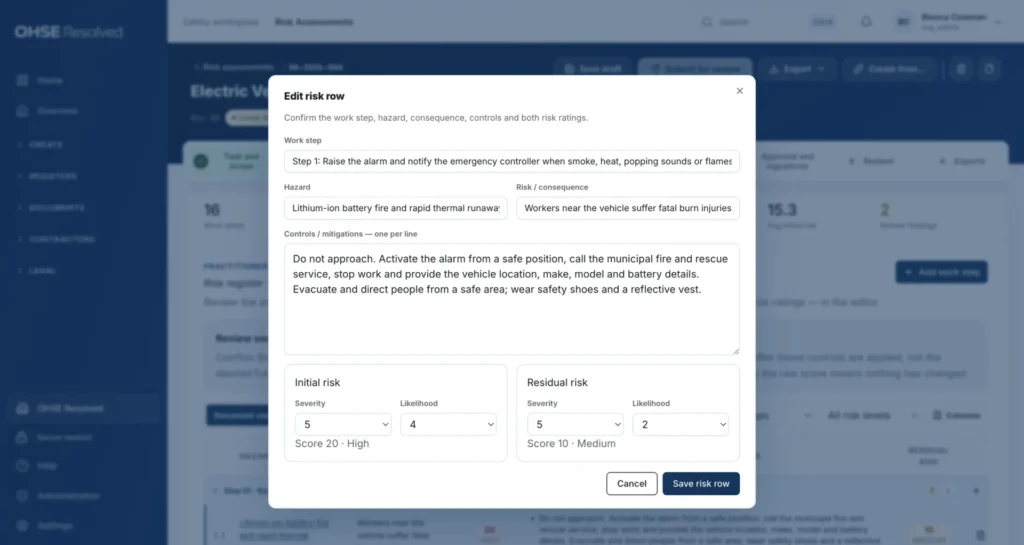
Edit the hazard row itself.
Work step, hazard, consequence and controls in plain fields, rated before and after controls. No consultant needed to fix a line.
- 1Plain fieldsThe people doing the work keep the assessment honest.
- 2Controls, one per linePrinted exactly as written, in order.
- 3Before and afterA residual that still matches the raw score is flagged.
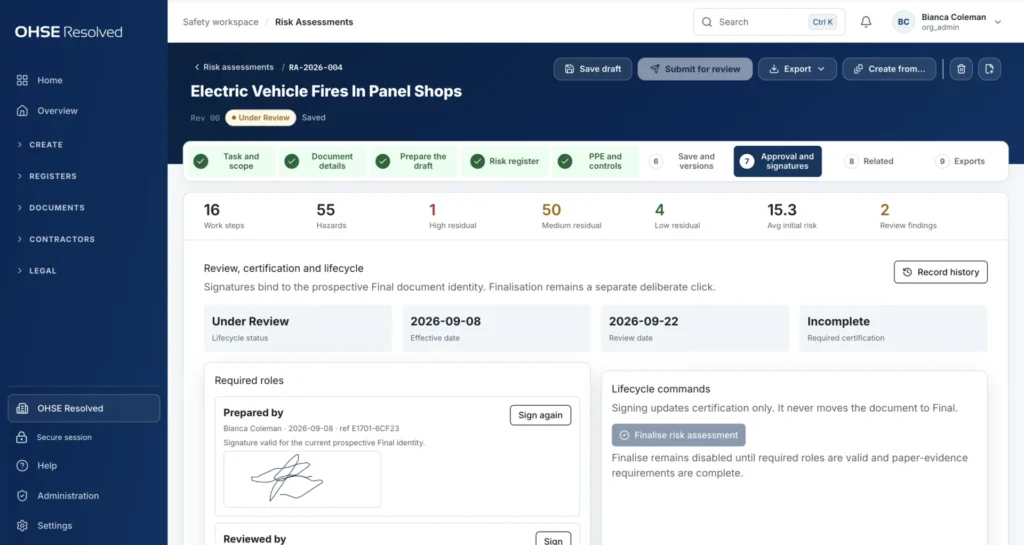
Sign-off locked to the version people read.
Preparer, reviewer and approver sign the exact version in front of them. Finalising is a separate, deliberate step.
- 1Required rolesEach role signs with a stored signature image.
- 2Finalise is deliberateRevisions supersede; they never overwrite.
- 3Dates requiredNo signature without effective and review dates.
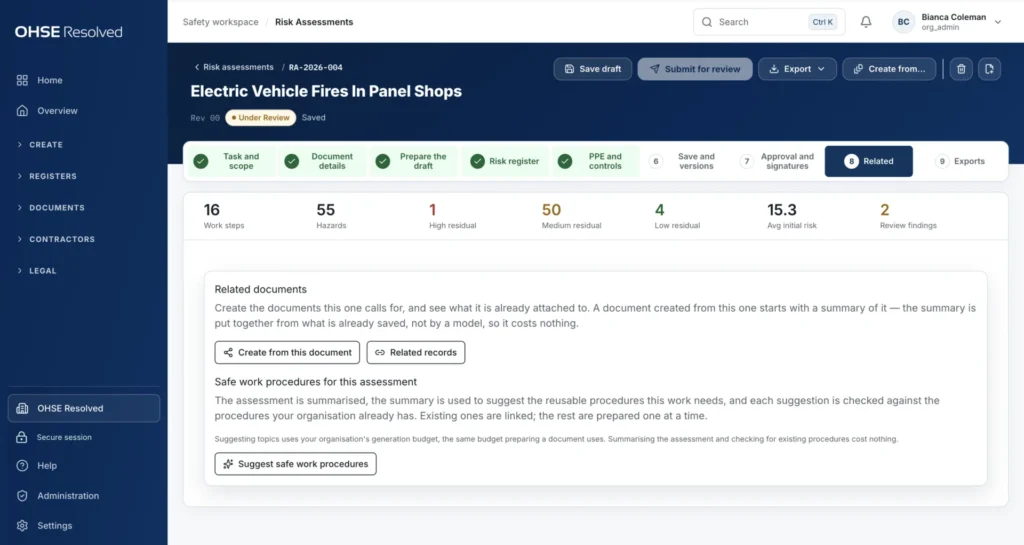
Every document knows what it created.
Create the method statement, procedure or toolbox talk an assessment calls for, linked back to its source.
- 1Create from this documentThe next document starts with its source linked.
- 2Suggest proceduresChecks what you already have before suggesting more.
- 3Related recordsIncidents, changes, equipment and procedures, one link away.
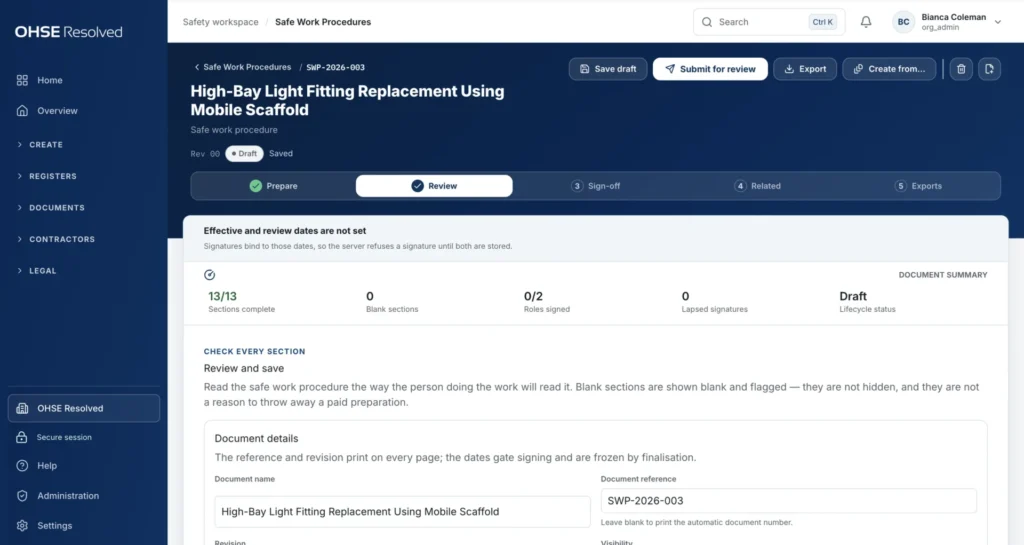
Procedures people can read, review and sign onto.
Thirteen fixed sections from purpose to emergency actions, then reviewed, signed and exported. Blank sections are flagged, never hidden.
- 1Readiness at a glanceSections complete, roles signed, lapsed signatures.
- 2The same rhythmPrepare, review, sign, relate, export.
- 3Export and create fromWord and PDF with your logo, or generate the toolbox talk.
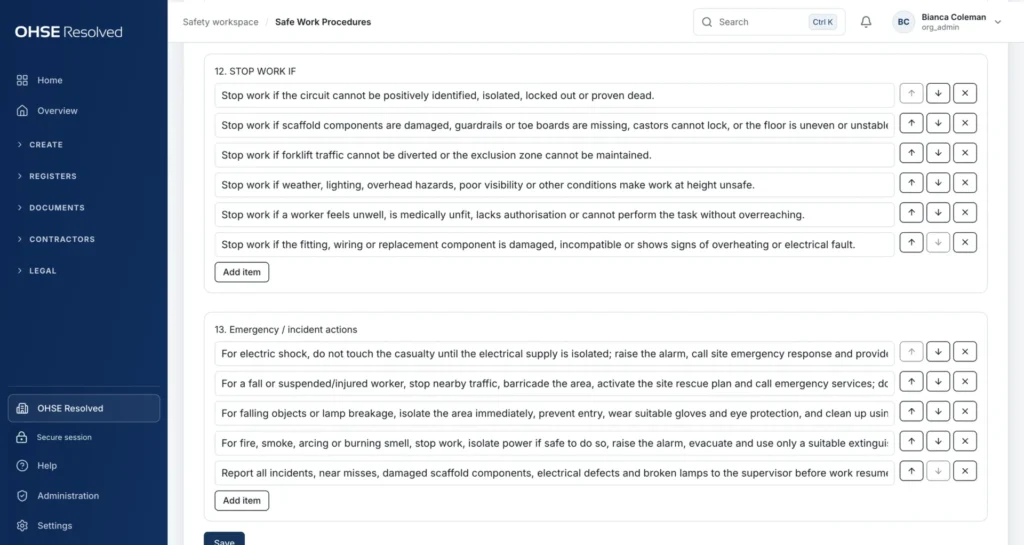
Stop-work triggers written into the procedure.
Stop-work conditions and emergency actions are part of the document the crew signs onto — not a separate file.
- 1Stop work if…Written down before the job starts.
- 2Emergency actionsPart of the same document.
- 3Reorder and removeEvery published revision is kept.
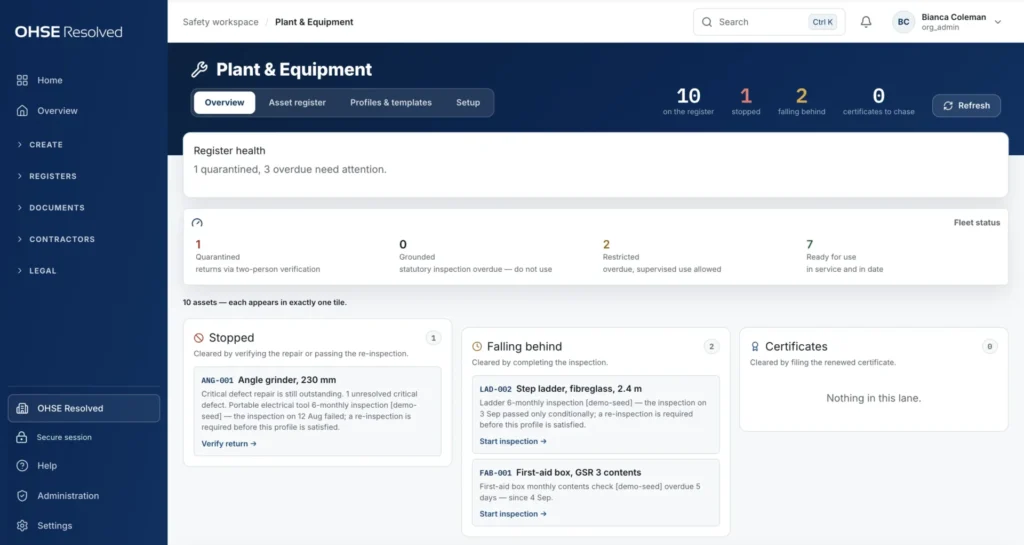
Every asset in exactly one state.
Machines, vehicles, lifting gear and emergency equipment, inspected on schedule. Whether an asset may be used is worked out from its inspections and defects — nobody types a status.
- 1Fleet statusQuarantined, grounded, restricted or ready.
- 2StoppedA second person must confirm the return to service.
- 3Falling behindOverdue inspections with a one-click route to fix them.
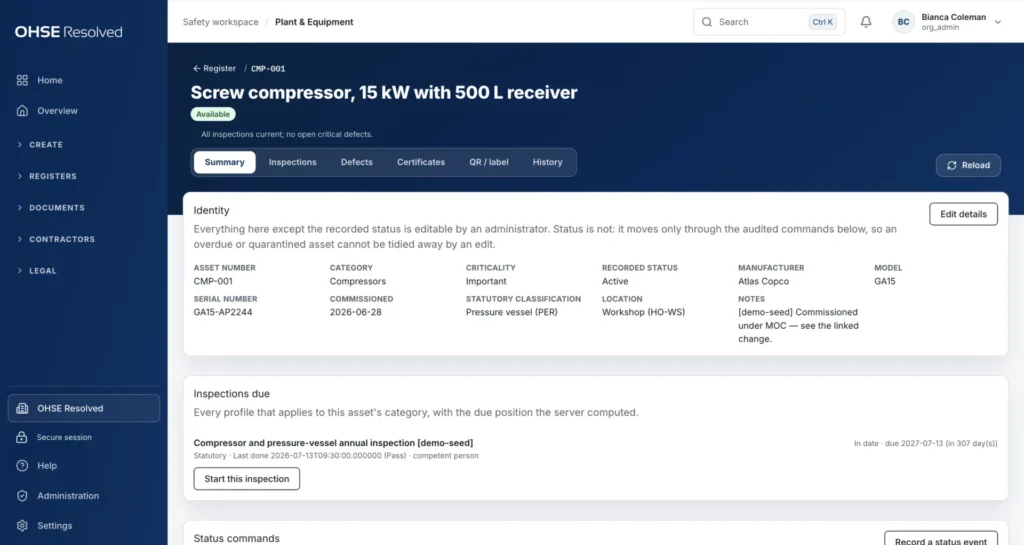
One record per asset.
Statutory class, inspection profiles, defects, certificates, QR label and full history. Status changes are logged and cannot be edited away.
- 1Everything an inspector asks forIn one place.
- 2Statutory classificationDecides which inspections apply and how often.
- 3Inspections dueLast result, who did it, next due.
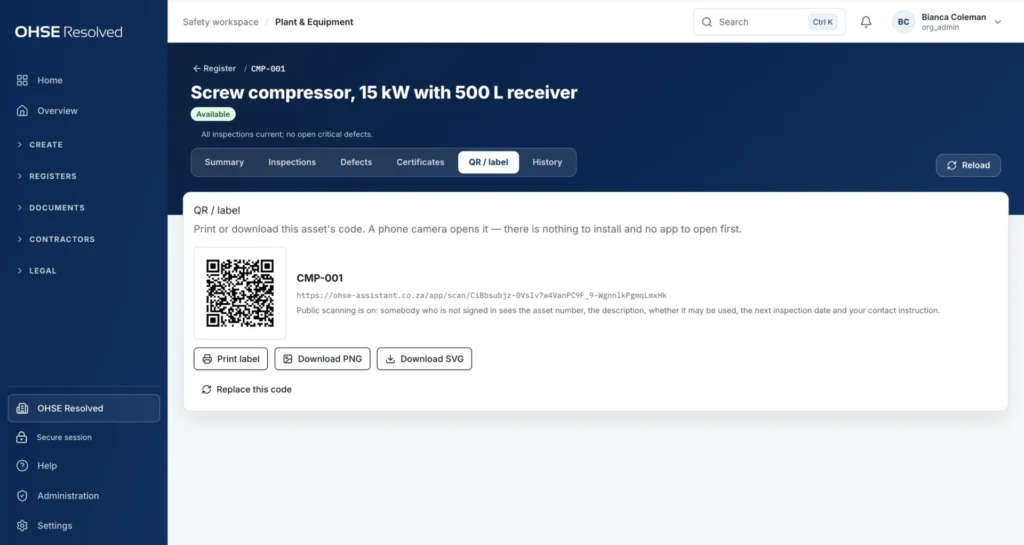
A QR label that puts the live status on the machine.
A phone camera opens it — nothing to install — and shows whether the equipment may be used. Print single labels or A4 sheets of 48.
- 1Print or downloadPNG, SVG or a PDF label sheet.
- 2Public scanning, switched on by youFive fields, nothing else.
- 3Replace the codeThe old code stops working at once.
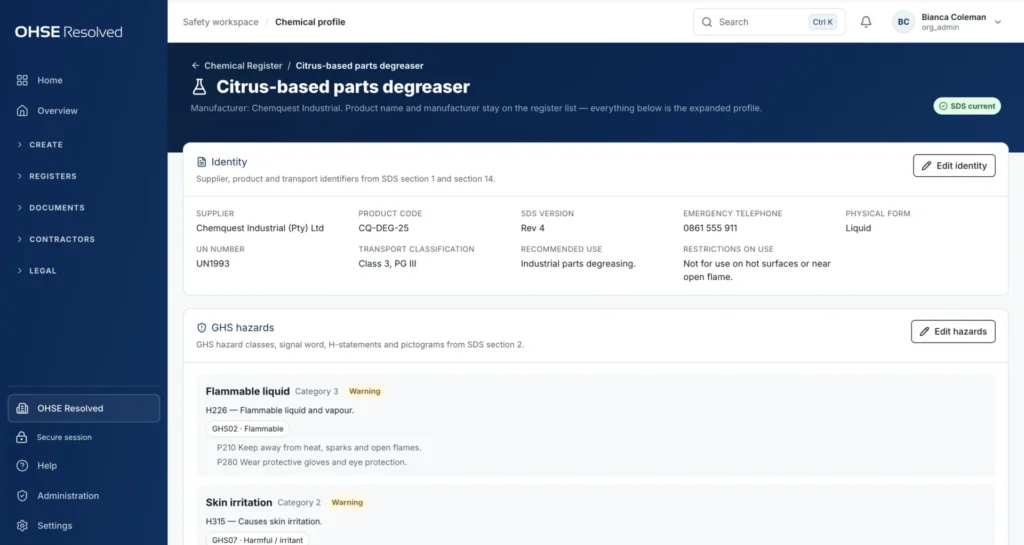
From a chemical list to the substance and its evidence.
Every hazardous chemical with its SDS filed and linked: GHS hazards, ingredients, exposure limits, storage and version history.
- 1Identity from the SDSSupplier, product code, UN number, transport class.
- 2GHS hazardsClass, signal word, H- and P-statements, pictogram.
- 3SDS statusCurrent, expired or missing — on the entry itself.
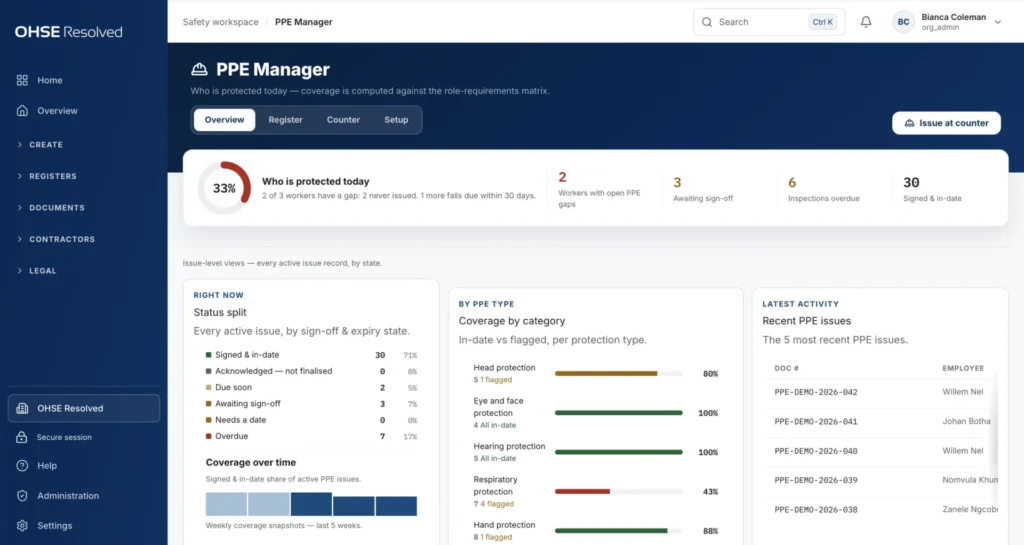
PPE coverage that is calculated, not claimed.
Catalogue, issue, sign-off, inspection and stock. A worker counts as protected only when every item their role requires is issued, signed for and in date.
- 1Who is protected todayGaps, sign-offs pending, overdue inspections.
- 2Coverage by protection typeHead, eye, hearing, respiratory, hand and more.
- 3Issue at the counterHand the phone over for the signature.
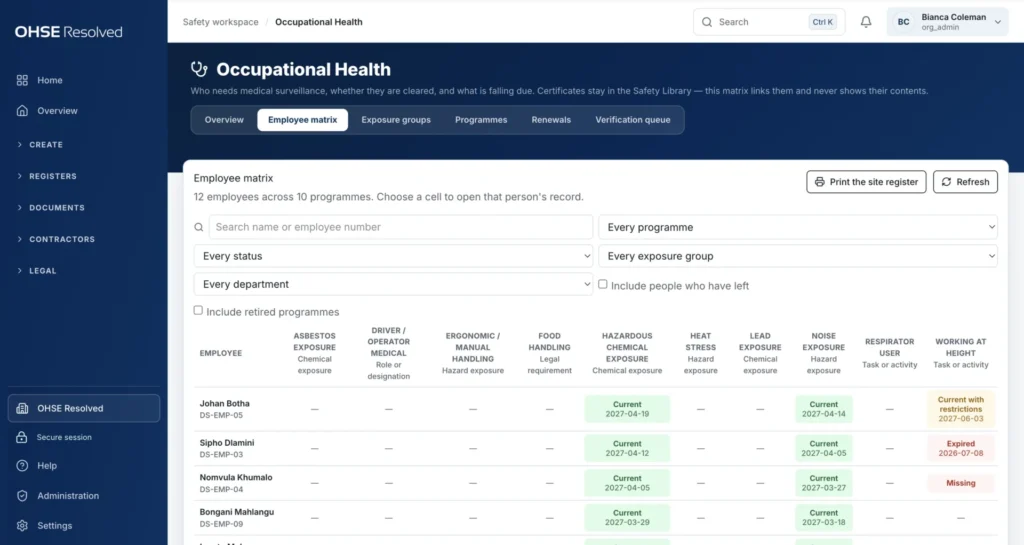
Medical surveillance status without the medical detail.
Who needs surveillance, who is cleared, restricted, expired or missing, per programme. Certificates stay in the library; the matrix never shows what is in them.
- 1One column per programmeAsbestos, noise, chemicals, height and more.
- 2Status cellsCoded restrictions, never free-text medical detail.
- 3Filters and exportsBy programme, status, exposure group and department.
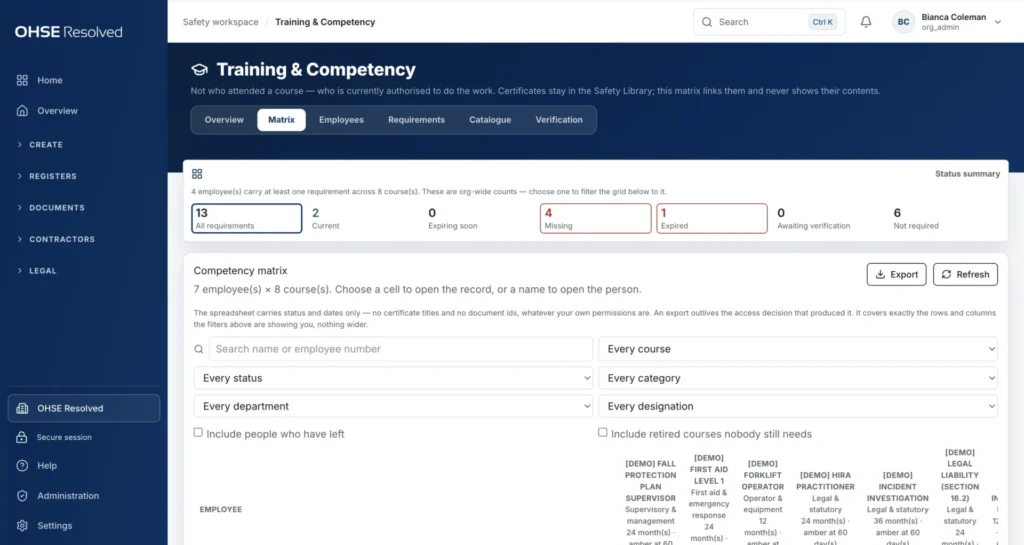
Who is authorised to do the work — right now.
Not who attended a course, but who is currently authorised. Only verified, in-date records count.
- 1Status summaryCurrent, expiring, missing, expired, awaiting verification.
- 2Requirements from rolesAdd a person to a role and see what they still need.
- 3Verified before it countsA captured certificate authorises nobody until verified.

Investigations drafted from the facts, finished by the investigator.
Actual harm goes to a full investigation; potential-only events to a near-miss report. The tool drafts, the investigator edits every section.
- 1The why-ladderFrom immediate cause to management-system cause.
- 2Edited before it is certifiedNothing counts until saved, signed and finalised.
- 3A recognised methodModelled on the HSG245 sequence.
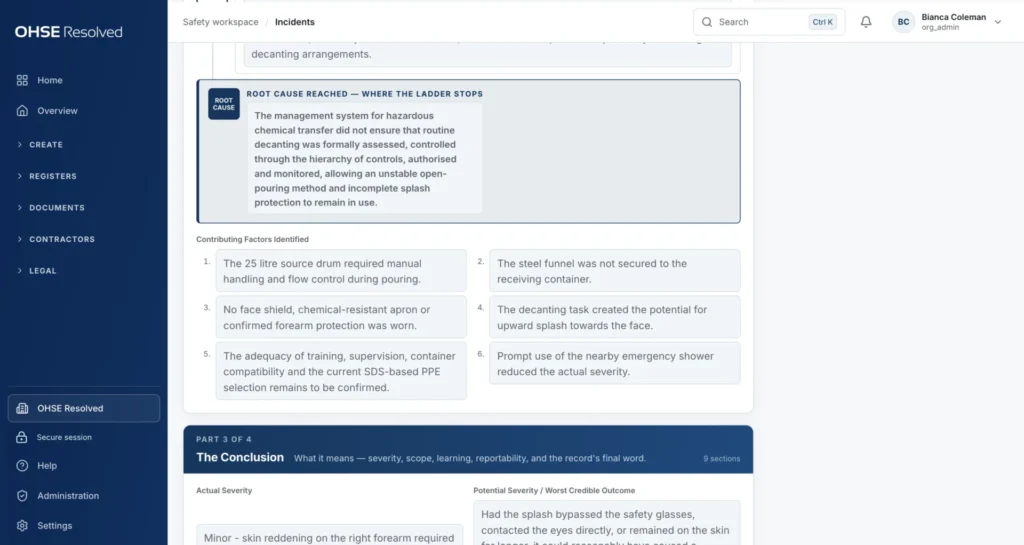
Root cause, traceable to the actions.
One root-cause statement with the contributing factors beside it, so every corrective action traces back to its cause.
- 1Root cause reachedThe sentence an inspector looks for.
- 2Contributing factorsIncluding what reduced the severity.
- 3The conclusionSeverity, scope, learning and reportability.

Corrective actions locked once certified.
Every action has an owner and a date. After certification, actions can only be progressed, evidenced and closed — never added or removed.
- 1Certified commitmentsAction, cause, owner and due date, locked.
- 2Owner and targetOpen and overdue actions surface on the Overview.
- 3Case snapshotSite, date and certification beside every stage.

Control a change before it becomes a hazard.
Screening, impact review, actions, approvals, verification and close-out. Temporary changes must carry an expiry date and a reversion plan.
- 1The pathEvery stop from draft to close-out.
- 2Named approvalsSequential or parallel; every stage must agree.
- 3On the clockAn expired bypass surfaces on the Overview.
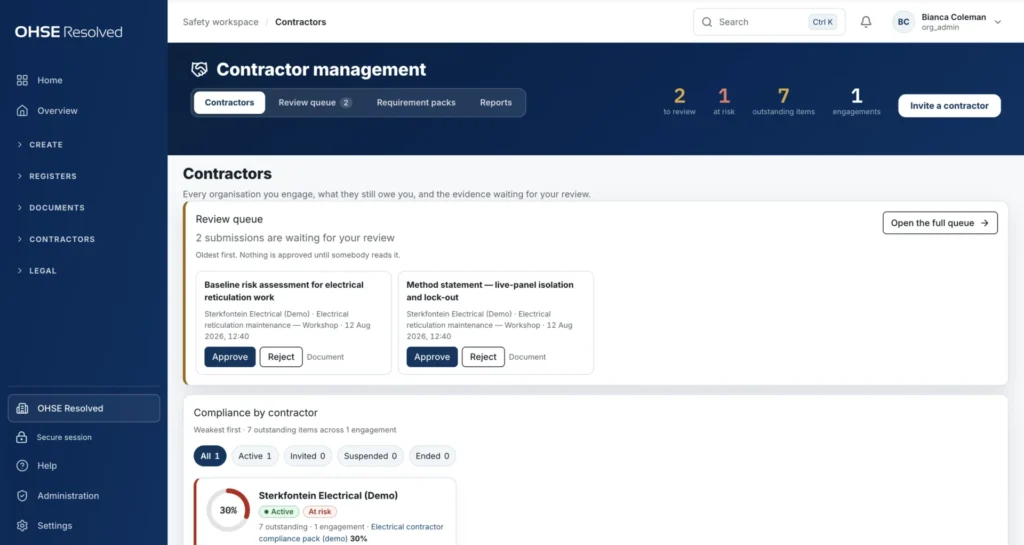
Every contractor, what they still owe you, and what is waiting for review.
One view of every organisation you engage. Nothing is approved until a person has read it.
- 1Review queueOldest first; every submission needs a human decision.
- 2Compliance by contractorWeakest first, outstanding items counted against the pack.
- 3Invite a contractorThey get their own workspace to submit evidence.
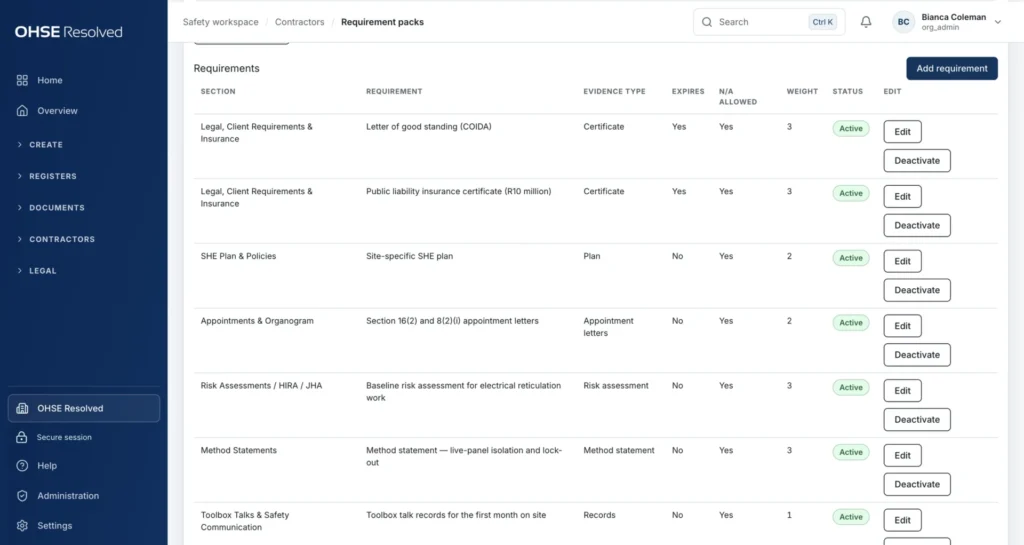
Requirement packs: define once what every contractor must submit.
Start from a library of ready-made packs — work at height, hot work, confined space, lifting, chemicals — or build your own, with expiry rules and weights.
- 1What must be submittedLetters of good standing, insurance, SHE plans, appointments, risk assessments.
- 2Expiry and weightExpiring documents are tracked; important ones count for more.
- 3Add a requirementEvery pack is yours to edit.
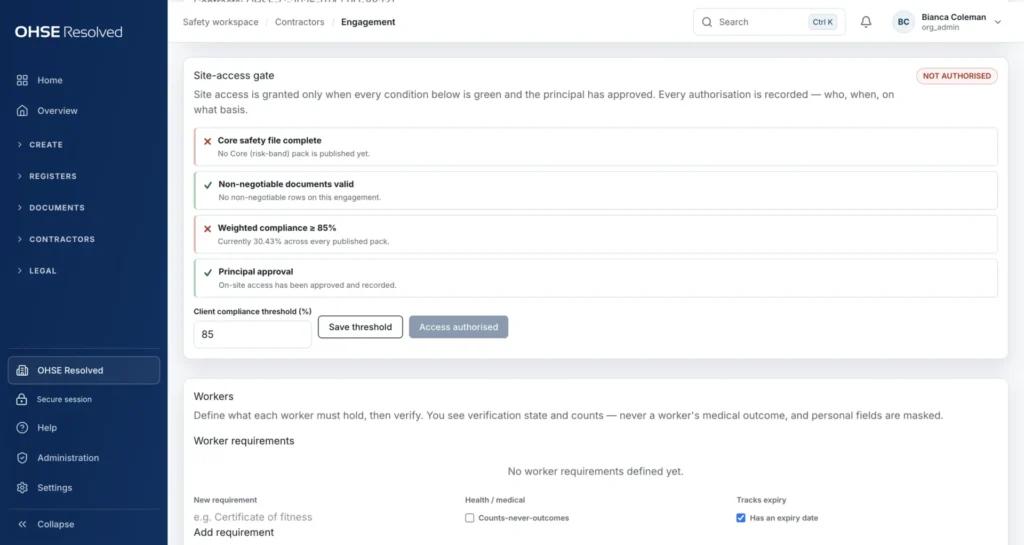
Site access is a gate, not a guess.
Access is authorised only when every condition is green and the principal has approved. Every authorisation is recorded — who, when, on what basis.
- 1Every condition visibleCore file, non-negotiable documents, weighted compliance, approval.
- 2Not authorised until greenThe gate cannot be talked open.
- 3Your thresholdSet the compliance percentage your contract demands.
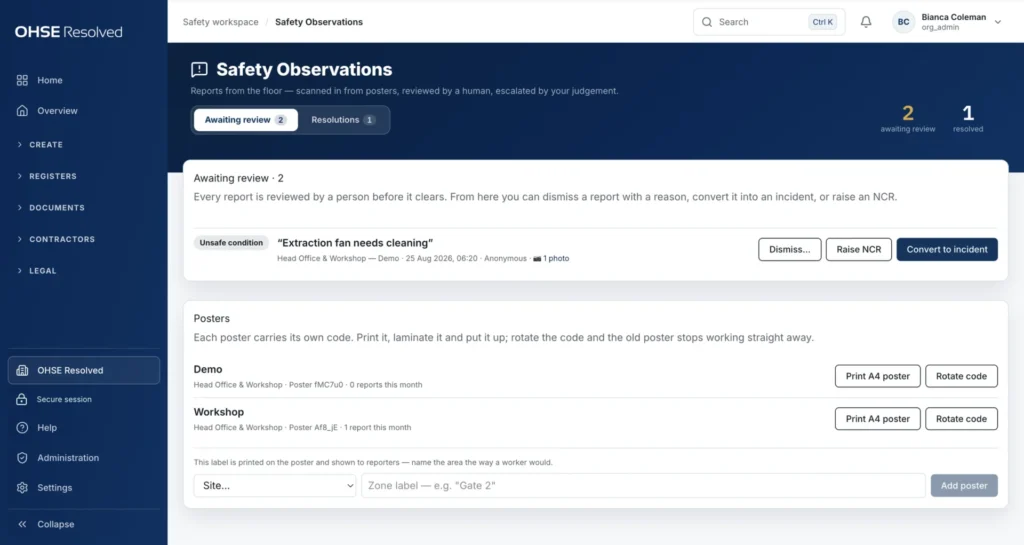
Anyone can report. A person reviews.
Scan a poster and report a near miss, unsafe act, unsafe condition or good practice — anonymously if they choose. A safety officer dismisses, raises an NCR or converts it into an incident.
- 1Awaiting reviewEvery report is reviewed by a human.
- 2Convert or raiseOne click to an incident or an NCR, link kept.
- 3Posters with rotating codesRotate the code and the old poster stops working.
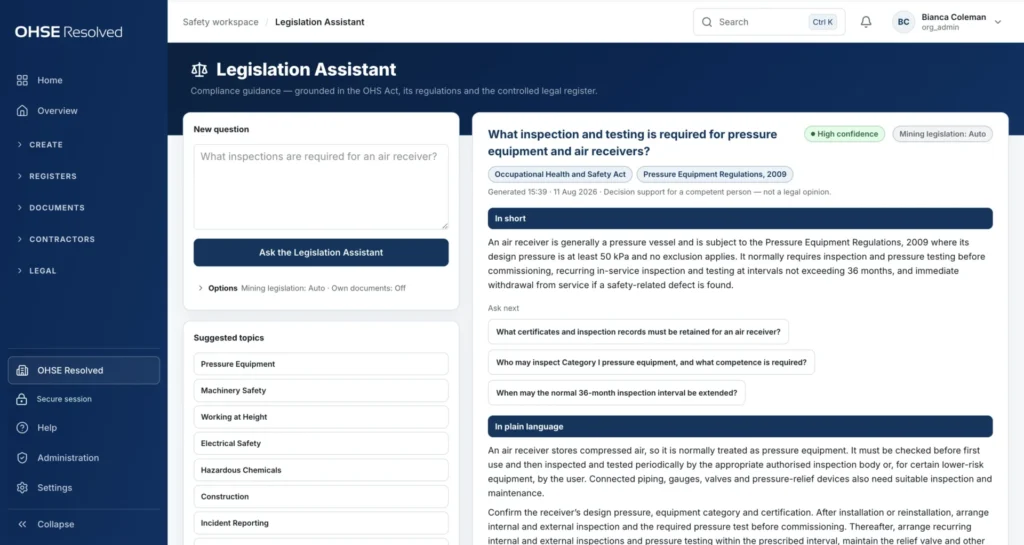
Ask the law a question. Get a sourced answer.
Plain-language answers from the OHS Act, its regulations and your own legal register, with confidence and sources shown. Decision support for a competent person — not legal advice.
- 1Confidence and groundingThe instruments each answer rests on.
- 2In shortThe direct answer first, then the detail.
- 3Ask nextFollow-up questions, saved to history.

From the answer to a checklist you can file.
Every answer ends with cited provisions and an action checklist. Download it or file it into the Safety Library as evidence.
- 1Cited provisionsRegulation numbers, checkable at source.
- 2Your action checklistConcrete steps, ready to assign.
- 3File it as evidenceQuestion, answer and date preserved.
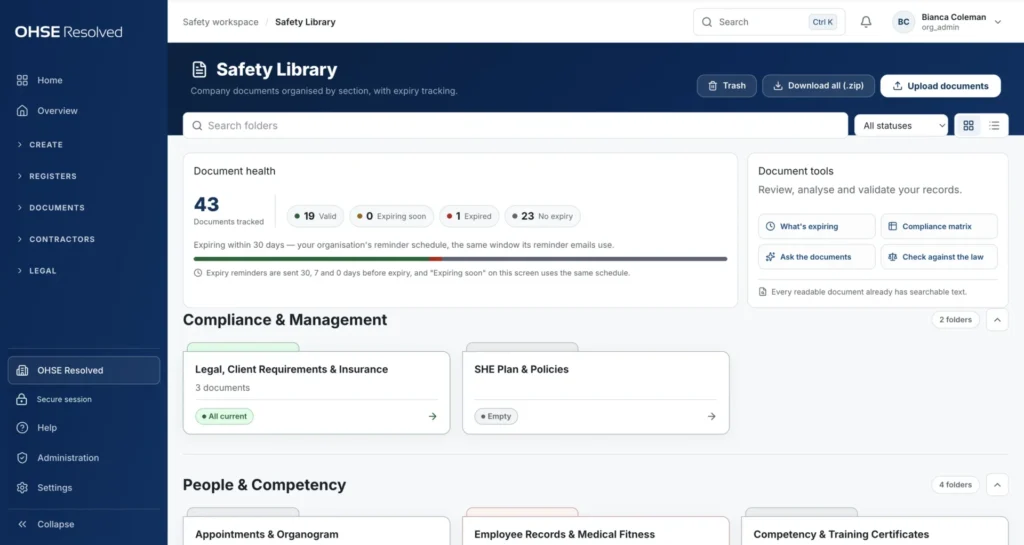
One controlled library behind every register.
Documents by section and folder, version history, expiry tracking and reminders at 30, 7 and 0 days. Registers link to documents here rather than copying them.
- 1Document healthValid, expiring, expired and no-expiry counts.
- 2Document toolsWhat's expiring, compliance matrix, ask the documents, check against the law.
- 3A fixed structureEvery safety file looks the same to an auditor.
The same system on any phone — no app to install.
Workers report from a poster, supervisors issue PPE at the counter, operators scan a machine before using it, and managers see what is stopped from wherever they are. It runs in the phone's browser and posters and QR labels need no login at all.
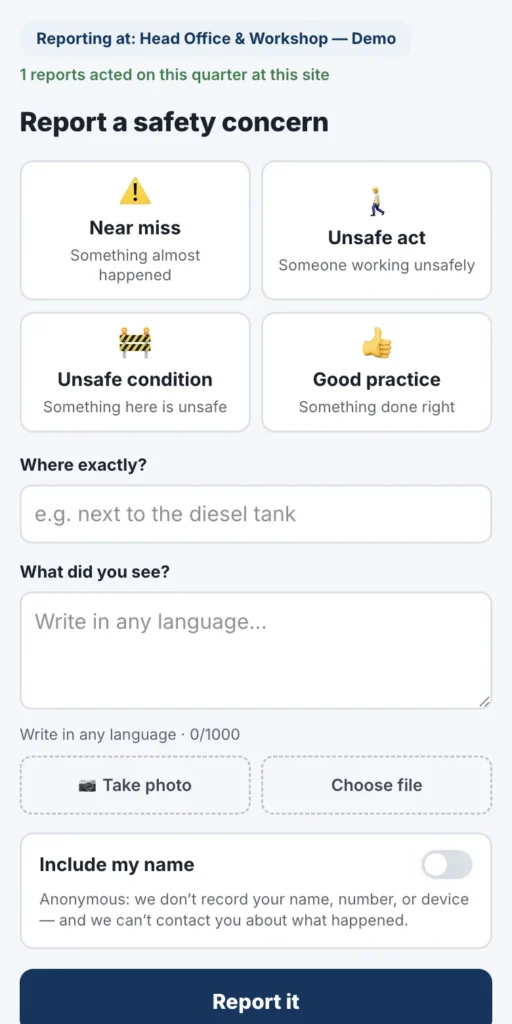
Report a concern from a poster
Scan the poster, report a near miss or unsafe condition with a photo — anonymously if they choose. No app, no login.
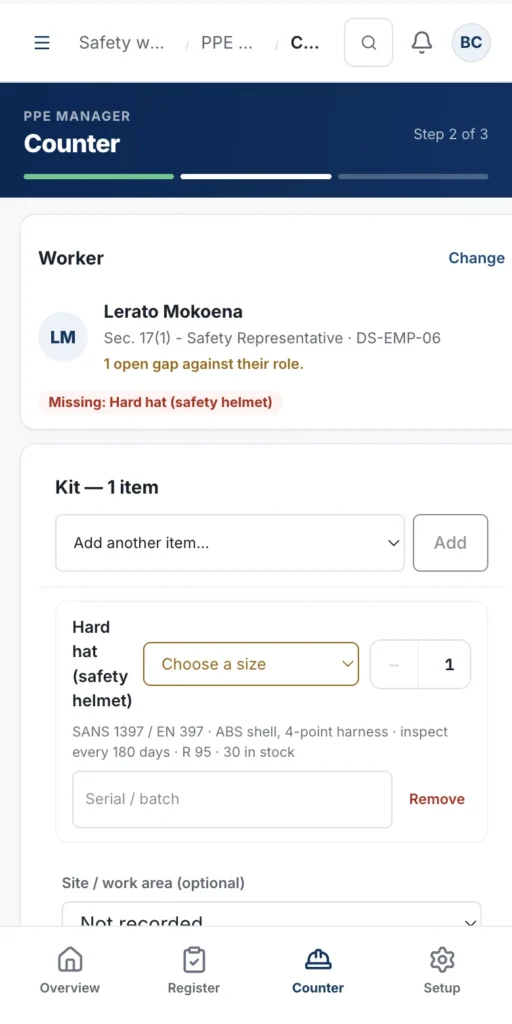
Issue PPE at the counter
Pick the worker, add the kit, hand the phone over for the signature. The slip and signature land on the register.
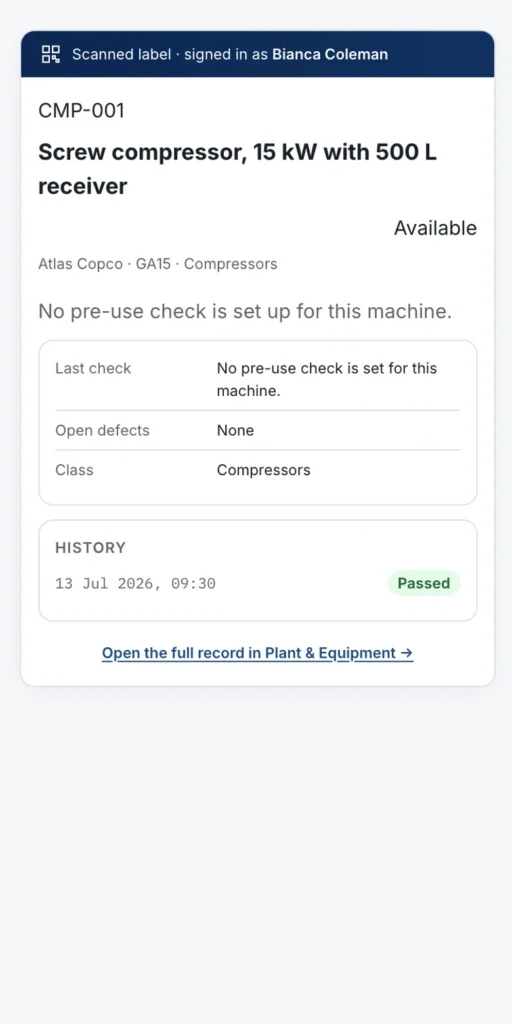
Scan a machine before using it
Every asset's QR label shows whether it may be used and when the next inspection is due.
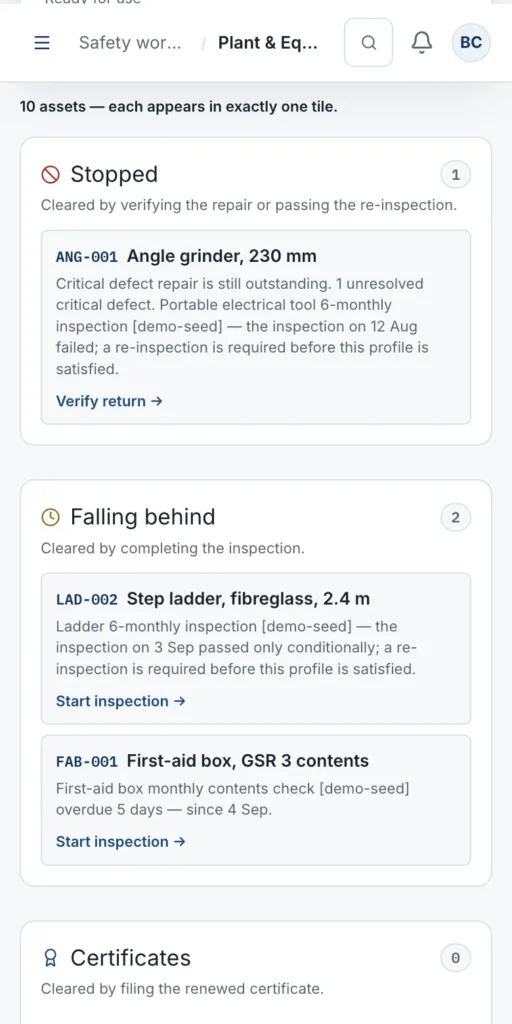
See what is stopped, wherever you are
Managers and safety reps get the same registers on the phone.
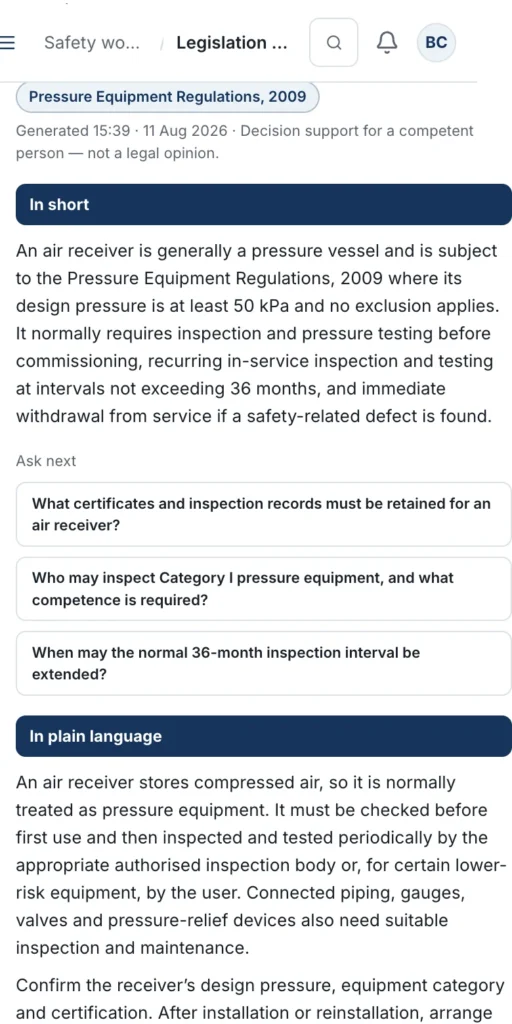
Ask the law from the site
A sourced, plain-language answer with a checklist — at the gate or in the plant.
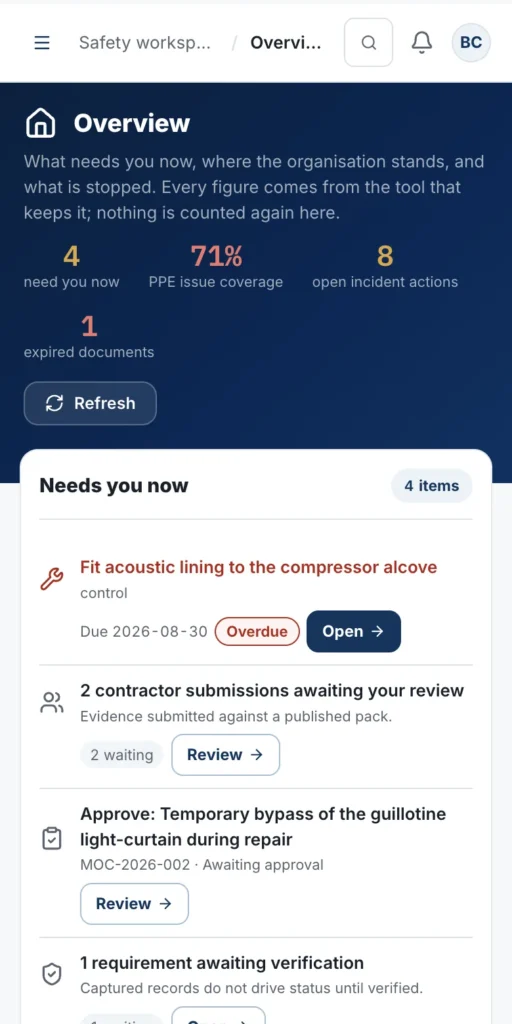
The whole picture in your pocket
Overdue actions, approvals waiting on you and every register's position.
Twenty-one tools. One system.
Every tool is in the deployed product today and switched on per organisation. Each keeps its own records and links to the others instead of copying their data.
Plan the work
- Risk Assessments
- Method Statements
- Scopes of Work
- Safe Work Procedures
- Toolbox Talks
Run the registers
- Sites
- Incidents
- PPE Manager
- HSE Objectives
- Management of Change
- Plant & Equipment
- Occupational Health
- Training & Competency
- Audits & Inspections
- Safety Observations
Control documents
- Safety Library
- Chemical Register
Contractors
- Contractors
- Contractor engagement workspace
Legal
- Legal Register
- Legislation Assistant
Hosted in South Africa. Yours to take with you.
OHSE Assistant runs on xneelo Cloud in Johannesburg over an encrypted (TLS) connection. Your organisation's data stays in South Africa.
Database and documents are backed up nightly, verified, and pushed to an offsite copy, with a fourteen-day rolling history and a staged, tested restore procedure.
Authenticator-app two-factor authentication is enforced for administrators and available to every user. Devices can be trusted for up to 30 days; high-risk admin actions ask for the password again.
An administrator can export the whole organisation — documents, version history and registers — as a ZIP at any time. Every change is written to an audit log with who and when.
Medical certificates stay in the Safety Library and are never shown in the matrices; contractor ID numbers are masked; anonymous floor reports store no name, phone or device details.
Organisation administrators, users and per-tool capabilities. Users can be limited to one or more sites, or given company-wide access.
Our terms set out the operator relationship under POPIA, what is stored and for how long. Personal information is processed only for the safety records you keep.
Every tool is enabled per organisation, so you pay for and see only what you use. Ask us for a quote.
Set up by the consultants who do this work every day.
OHSE Assistant is built and run by OHSE Resolved — the team that writes safety files, runs audits and stands beside our clients when the inspector arrives. You do not get a login and a manual; you get a working system, and we agree the go-live date with you at kick-off.
- 01ConfigureSites, employees, roles, PPE requirements, equipment profiles and legal applicability are set up with you.
- 02SeedYour existing risk assessments, procedures, chemicals and plant are loaded, so the system is useful from the first day.
- 03TrainSupervisors and safety representatives are trained on the tools they will actually use — issuing PPE, running inspections, reviewing floor reports.
- 04SupportOngoing support, and optional quarterly audits under a consulting agreement, keep the registers honest.
Before you book a demo.
Is there a mobile app?
OHSE Assistant runs in the phone's browser — nothing to install and nothing to update. Posters and QR labels open public pages that need no login. It does need a connection; there is no offline mode.
Can we bring in our existing risk assessments and procedures?
Yes. Existing documents are filed into the Safety Library as controlled evidence, with details extracted on upload. During seeding we rebuild the assessments and procedures you still work from as live registers, so they can be revised and signed inside the system.
Do contractors need their own licence?
Contractors are invited into their own engagement workspace to submit evidence against your requirement pack. Contact us for how contractor access is included in your quote.
Where is our data hosted, and who owns it?
In Johannesburg, on xneelo Cloud. Your organisation's data belongs to you: an administrator can request a complete export — documents, version history and registers — at any time.
Is the Legislation Assistant legal advice?
No. It is AI-assisted decision support for a competent person, grounded in the OHS Act, its regulations and your legal register, and every answer cites the instruments it relies on so you can verify it.
Can we run more than one site?
Yes. Sites are the backbone of the registers, and users can be limited to one or more sites or given company-wide access.
How is it priced?
Per organisation, based on your sites, users and the modules you switch on. Set-up, seeding and training are quoted with it. Contact us for a quote.
Does it support single sign-on?
Not yet. Sign-in uses email and password with authenticator-app two-factor authentication, enforced for administrators and optional for users.
See it on records that look like yours.
Tell us about your sites, your people and the work you control. We will walk you through OHSE Assistant in a private 30-minute session and come back with a quote for your organisation.
- Private walkthrough on sample records from your industry
- Configuration, seeding and training quoted with the software
- Contractor-ready and multi-site from day one
- Built and supported by OHSE Resolved, health and safety consultants since 2021
Prefer to talk? 081 496 4093 · info@ohseresolved.co.za
Request a demonstration
We reply within one working day.
OHSE Assistant supports the competent people responsible for health and safety; it does not replace them. The Legislation Assistant provides AI-assisted decision support grounded in South African legislation and is not legal advice. Screens shown are captures of the deployed application on sample records.